
Evaluating ASR Systems, Part 3: Latency and Responsiveness
Why speed matters as much as accuracy
Author: Ognjen Todic | April 23, 2026In Part 1, we introduced several key dimensions for ASR evaluation, latency being one of them. In Part 2, we focused on accuracy and robustness.
Now let's talk about speed. A speech recognition system that's highly accurate but slow can feel broken. Users don't experience milliseconds; they experience responsiveness. And the factors that determine perceived responsiveness are often different from what you might expect.
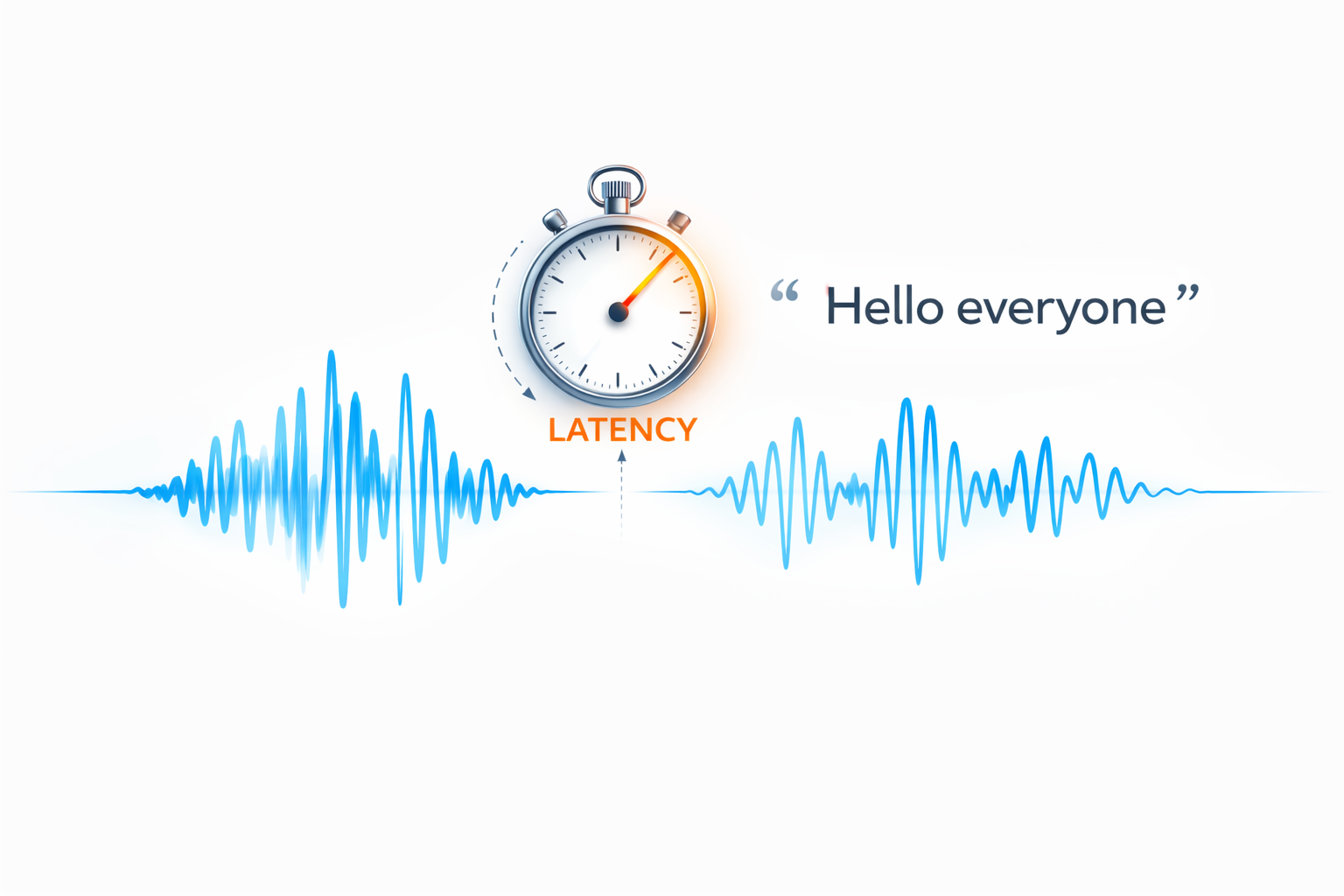
This post explores the components of latency, the difference between technical latency and perceived responsiveness, and why endpointing is often the biggest lever you have.
The Real-Time Constraint
For any real-time speech recognition system, there’s a fundamental requirement: a chunk of audio with duration T must be processed in less than T seconds most of the time. Occasional spikes are tolerable, but if processing consistently takes longer, audio buffers overflow, data is lost, and recognition quality degrades.
Meeting this constraint is more critical for on-device ASR than for cloud-based systems. Mobile and embedded devices are typically less powerful than servers, and there’s a much wider variety of CPUs in the wild, so the same model can comfortably hit real-time on one device and fall behind on another.
This constraint is expressed as the Real-Time Factor (RTF):
An RTF of 0.5 means the system processes audio twice as fast as real-time. An RTF of 1.2 means it’s falling behind. For real-time ASR processing, RTF < 1 isn’t a nice-to-have; it’s a hard requirement for any interactive or continuous-listening application. Beyond meeting this threshold, lower RTF values don’t improve the user experience directly, but they free up CPU cycles for other tasks. Since ASR typically runs on a single core and most mobile CPUs have four to eight cores, even an RTF of 0.99 leaves plenty of headroom for other application tasks on the remaining cores.
What Affects Chunk Processing Time
The core ASR inference processes audio chunks through the model and searches for the best word sequence. This is what determines RTF and streaming/partial result latency. Key factors include model size, model architecture (specifically right context, i.e., how much future audio the model needs to see), audio chunk size, computational efficiency, and CPU speed.
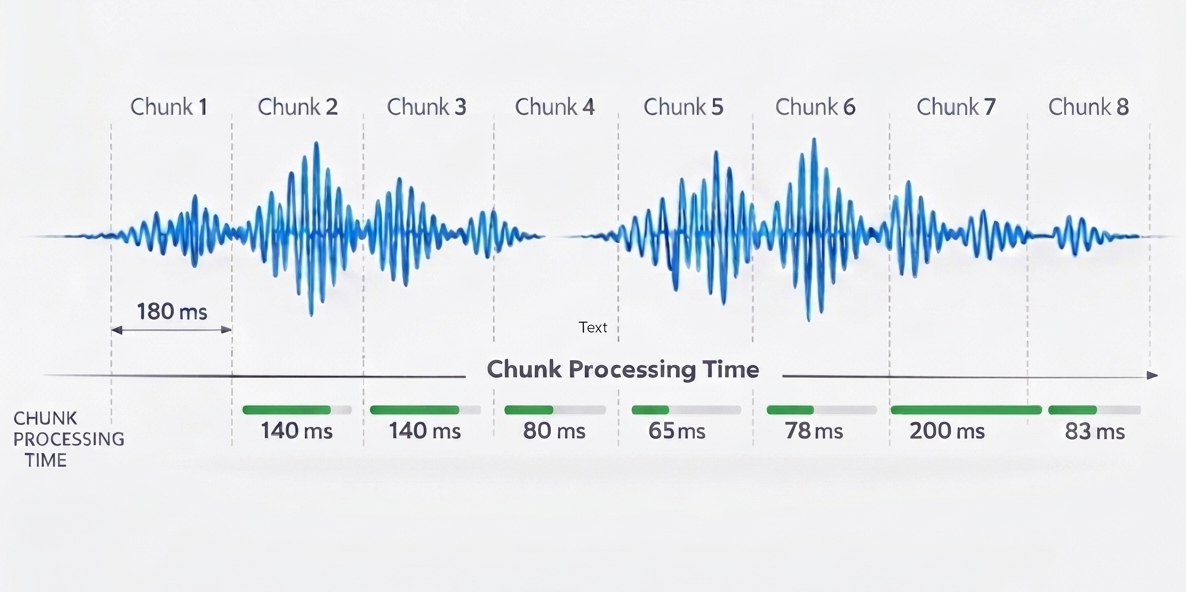
It’s not a problem if chunk processing time occasionally exceeds the chunk duration (as with Chunk 6 above, where 200ms of processing exceeds the 180ms chunk length). The system will catch up during the next chunk. However, if this happens frequently, the real-time factor exceeds 1, resulting in noticeable latency and eventually causing audio buffers to overflow.
For cloud-based systems, network round-trip time also contributes to streaming latency. Each audio chunk must be sent to the server and partial results returned, adding network delay on top of processing time. Network latency varies with connectivity, server load, and geographic distance.
What Contributes to Final Result Latency
Once the user stops speaking, additional factors determine how long it takes to produce the final result:
Endpointing Delay The system needs to detect when the user has stopped speaking before it can finalize the result. This detection isn’t instantaneous; it requires observing enough silence to be confident that the utterance is complete. We’ll return to this topic in detail.
Post-Processing Latency After the system determines the user has stopped speaking, additional computation may be needed to produce the final result. Confidence scores, word-level timestamps, alignment information, and Goodness of Pronunciation (GoP) scoring all add processing time. The richer the result data you need, and the longer the response is, the longer this takes.
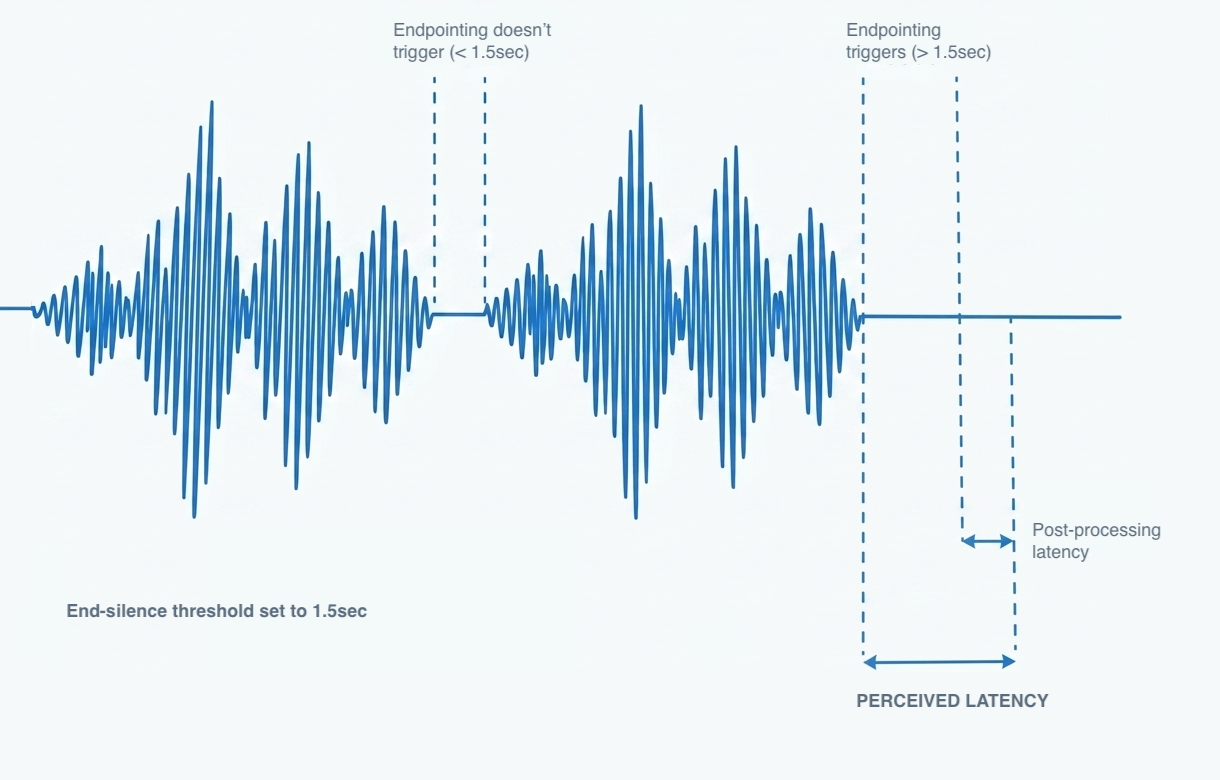
For cloud-based ASR systems, similarly to chunk processing time, network round-trip will also contribute to final result latency.
Final Result Computation
There’s a distinction between partial results (streamed incrementally while the user is still speaking) and final results (produced once endpointing has detected end-of-speech). Once the recognizer determines the user has stopped speaking, it stops capturing audio and begins computing the final result. Additional computation often happens at this stage.
Alignment and Timing Word-level and phoneme-level timestamps can be important in various assessment scenarios.
Confidence Recalculation and Rescoring Some systems recalculate confidence scores or apply additional language model rescoring at the end of an utterance. Rescoring is typically one of the bigger contributors to final result computation time.
Pronunciation Scoring (GoP) Goodness of Pronunciation scoring, used in language learning and reading assessment applications, requires evaluating the user’s pronunciation against expected phoneme sequences. GoP is typically the biggest contributor to final result computation time, and the length of the audio directly affects how long this takes.
The tradeoff is clear: richer result data takes longer to compute. If your application needs GoP scores, some latency is unavoidable. If it doesn’t, you can skip those computations and get results faster. Design your integration to request only the features you actually need.
Endpointing: The Latency Lever You Control
Many factors that contribute to latency are determined by architecture choices in the speech recognition engine and models, as well as device capabilities. These are largely fixed once you’ve chosen your platform. Endpointing configuration, however, is typically directly exposed to developers and can be tuned to reduce perceived latency for your specific use case.
Endpointing (also called endpoint detection or end-of-speech detection) determines when the user has finished speaking. This is often the single biggest contributor to perceived latency, and it’s frequently overlooked.
The Fundamental Tradeoff Aggressive endpointing means the system quickly decides the user is done, leading to faster response times. But if it’s too aggressive, it cuts off users mid-sentence, especially during natural pauses. Conservative endpointing waits longer to be sure, improving accuracy but making the system feel sluggish. For more details on how KeenASR handles this, see the developer documentation.
Choosing Endpointing Thresholds Based on the Task The right endpointing threshold depends on the type of interaction. A voice command application expects short, decisive utterances and can use aggressive thresholds. A dictation application or a child trying to read a sentence expects longer passages with natural pauses and needs more patience.
- Shorter expected utterances (single commands, confirmations): Tighter thresholds, faster endpointing
- Longer utterances (dictation, reading passages): Looser thresholds, more tolerance for pauses
Dynamic Adjustment During Recognition The KeenASR SDK also allows you to adjust endpointing parameters while the recognizer is actively listening. Starting with a longer timeout allows users to hesitate or pause as they gather their thoughts. As they speak more and the application determines that the response is complete or close to complete, endpointing thresholds can be dynamically reduced. This approach balances patience at the start with responsiveness at the end.
Tuning endpointing for your specific use case is often the most effective way to improve perceived responsiveness.
Perceived Latency: What Users Actually Experience
Here’s an important insight: users don’t measure milliseconds; they experience responsiveness. And perceived responsiveness can differ significantly from technical latency.
Streaming Results Systems that display partial results as the user speaks feel more responsive than those that wait for final results. Even if the total time to final result is the same, seeing words appear in real-time creates a sense of immediacy. The user knows the system is listening and working.
Visual Feedback Waveform displays, “listening” indicators, and audio feedback (earcons) can mask latency by showing the user that something is happening. These design choices don’t reduce actual processing time, but they reduce the perception of waiting.
Interaction Design How you structure the interaction matters. If the user triggers recognition with a button press and then sees immediate visual feedback, brief processing delays feel natural. If the system is supposed to respond instantly to wake words but takes a beat too long, users notice.
The gap between technical latency and user perception is an opportunity. You can often make a system feel faster through design choices, even without changing the underlying ASR performance.
Latency-Accuracy Tradeoffs
Latency and accuracy are often in tension:
Model Size. Smaller models run faster but may sacrifice accuracy. Larger models are more accurate but require more computation. The right choice depends on your device constraints and accuracy requirements.
Vocabulary Constraints. Constrained vocabularies and phrase lists allow faster decoding than open dictation. If you know what the user is likely to say, you can search a smaller space and get results more quickly.
Endpointing Aggressiveness. As discussed, tighter endpointing improves response time but risks cutting off speech. The right threshold depends on your use case.
Finding the right balance requires testing with representative data and real users. A system that’s slightly less accurate but noticeably more responsive might deliver a better overall experience.
On-Device vs. Cloud
On-device and cloud ASR have fundamentally different latency characteristics:
On-Device
- Consistent, predictable latency determined by device hardware
- No network dependency
- Same performance whether online or offline
- Latency is under your control
Cloud
- Variable latency based on network conditions
- Can leverage more powerful server hardware
- Latency depends on factors outside your control
- May be unsuitable for poor-connectivity environments
For applications where responsiveness is critical, or where network connectivity is unreliable (warehouses, field work, schools, hospitals, generally areas with poor coverage), on-device ASR’s predictable latency is a significant advantage.
Practical Takeaways
- Real-time ASR must maintain RTF < 1. If processing can’t keep up with real-time audio, lag accumulates and the experience degrades. This is especially critical for on-device ASR, where device capabilities vary widely.
- Endpointing is often the biggest lever. Tuning endpointing parameters for your specific use case can dramatically improve perceived responsiveness.
- Post-processing adds some latency. Richer result data, like GoP scoring for pronunciation assessment, takes extra time to compute. When those features are essential to your application, the added latency is worth it; when they aren’t, you can skip them for faster results.
- Perceived latency matters more than raw milliseconds. Streaming results and visual feedback can make systems feel faster.
- On-device eliminates network variability. For consistent, predictable responsiveness, local processing wins.
Coming Up
In future posts, we’ll explore computational efficiency (CPU, memory, and battery considerations) and practical guidance on setting up an evaluation workflow.
If you’re evaluating ASR solutions and latency is a concern, we’re happy to discuss what’s achievable for your use case. Get in touch.